




Product Information
What is Ytblock?
? Features:
• Blacklisted words and phrases (supports regex).
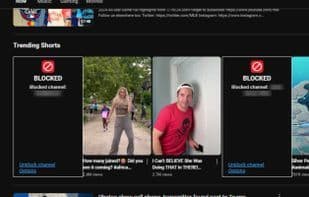
• Block channels, videos, comments, posts, and playlists.
• Block videos by title, category*, tags*, description*, duration, link, ID, views*, date*, and upload time*.
• Block videos by language*.
• Block shorts, live streams, premieres, and age-restricted videos.
• Block channels and whitelist channels.
• Block comments and posts based on their content or channel.
• Block playlists by channel, title, or even remix playlists.
• Toggle block overlays.
• Password protection.
• And more!
?* Notes:
A Google API key is required to fetch information about videos and channels (such as tags, categories, and descriptions) that isn’t visible on the YouTube™ page. The extension includes instructions on how to obtain one.
How to use Ytblock?
YTBlock is a browser extension designed to help users customize their YouTube viewing experience by blocking videos, comments, channels, posts, and playlists, filtering out unwanted or inappropriate content.
Core Functions of Ytblock
Distraction-Free, Block Interruptions
Usage Scenarios of Ytblock
- Block specific channels or videos containing sensitive words to purify viewing content.
- Filter out short videos, live streams, premieres, or age-restricted videos to match personal preferences.
- Block videos based on various criteria like title, category, tags, duration, or language.
- Block disliked comments or posts and manage unwanted playlists.
- Users can block numerous channels to enhance their YouTube viewing quality.
Common Questions about Ytblock
What does YTBlock do?
How do I use YTBlock?
What are the core features of YTBlock?
What are the application scenarios for YTBlock?
















