
Product Information
What is Android-p?
Android P beta has just released new features for you to try in your apps: 1) Indoor positioning with Wi-Fi RTT, 2) Display cutout support, 3) Enhanced messaging notifications, 4) Multi-camera API, 5) ImageDecoder for bitmaps and drawables, 6) HEIF image compression, 7) VP9 video support and media APIs, 8) Data cost sensitivity in JobScheduler, 9) Autofill improvements, 10) Open mobile API for NFC payments and secure transactions. Strengthening Android's foundation includes: 1) App security, 2) User privacy, 3) ART performance, 4) Kotlin optimizations, 5) Target efficiency, 6) Targeting modern Android, 7) Increasing app adoption through public APIs.
How to use Android-p?
Android P is the latest version of the Android operating system, offering new features and APIs to help developers build better apps and strengthen the platform's foundations like security, privacy, and performance.
Core Functions of Android-p
Supports Wi-Fi RTT indoor positioning
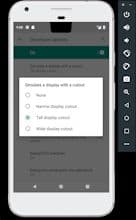
Supports irregular screen display
Improved message notifications
Multi-camera API
ImageDecoder handles bitmaps and drawables
Enhanced app security and user privacy
Usage Scenarios of Android-p
- Build indoor navigation applications
- Implement precise location-based services (e.g., voice control)
- Provide location-based product information
- Utilize the latest device screens to display full-screen content
Common Questions about Android-p
What does Android P do?
How do I use Android P?
What are the core features of Android P?
What are the use cases for Android P?