
Product Information
What is Chatgpt-add-in-for-outlook?
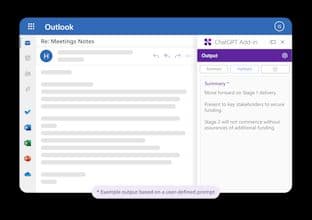
BlueBerry has released a free add-in for Microsoft Outlook, enabling users to experiment with ChatGPT within Outlook. The new add-in allows users to configure custom prompts to run ChatGPT on selected emails or new messages.
How to use Chatgpt-add-in-for-outlook?
ChatGPT Add-in for Outlook is a free Outlook plugin that integrates ChatGPT's AI capabilities into email handling, helping users efficiently summarize, refine, or reply to emails within Outlook.
Core Functions of Chatgpt-add-in-for-outlook
Create custom prompts to guide ChatGPT content generation
Choose to process entire emails or specific parts (e.g., body, subject, attachments)
Display output in a separate window with the option to replace the original email body
Manage multiple configurations including matching conditions, prompts, and display preferences
Usage Scenarios of Chatgpt-add-in-for-outlook
- Run ChatGPT when receiving inbox emails or composing new emails
- Quickly identify important information in emails
- Automatically update email importance based on generated content (e.g., mark as high priority)
- Deploy a unified ChatGPT email processing tool for teams
- Custom versions for resale
Common Questions about Chatgpt-add-in-for-outlook
What does the ChatGPT Add-in for Outlook do?
How do I use the ChatGPT Add-in for Outlook?
What are the core features of the ChatGPT Add-in for Outlook?
What are the application scenarios for the ChatGPT Add-in for Outlook?