




Product Information
What is One chat - all in one messenger?
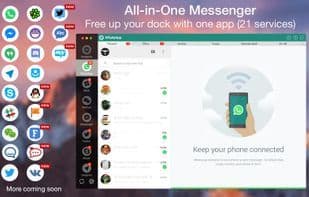
An app for all messaging services.
Use it for the following messengers and chat like a boss:-
WhatsApp, Facebook Messenger, Hangouts, Telegram, Skype, Slack, WeChat, Twitter, Yahoo Chat, ICQ Chat, HipChat, Discord, GroupMe, QQ, Facebook Page Messenger, VK, Fleep, RocketChat, MySMS, IRC Chat, TweetDeck.
Note: One Chat is a wrapper app that combines all messaging services. The experience will be 100% similar to the web extensions of these services.
Features:
✔ Schedule messages to be sent at a planned time.
✔ Send and receive photos, videos, documents, PDFs, and more.
✔ Use multiple parallel accounts for any service.
✔ Touch Bar support in 10.12 for selecting messaging services.
✔ Remember passwords for easy login.
✔ Receive corresponding notification alerts and reply the same way.
✔ Auto-smart GIFs for sending messages to friends.
✔ Mark all unread messages as read with just one click.
✔ Privacy mode to protect your message data.
✔ Customize the order of messaging services in the side menu.
✔ Make FaceTime calls via WhatsApp and Telegram numbers.
✔ Customize notifications according to your preferences.
✔ Display notification badges for individual services.
✔ Check the menu bar for any unread messages.
✔ Full-screen display! Chat with friends in full-screen mode without distractions.
✔ Lightweight with minimal installation size.
✔ Retina-enabled icons.
✔ Easy-to-use user interface (UI) and user experience (UX).
How to use One chat - all in one messenger?
One Chat is an all-in-one messaging app that consolidates WhatsApp, Facebook Messenger, Telegram, and more into a single platform, simplifying the management and use of multiple communication tools.
Core Functions of One chat - all in one messenger
Multi-account Support, Password Protection, Touch Bar Manager
Usage Scenarios of One chat - all in one messenger
- Manage and use multiple chat services like WhatsApp, Facebook Messenger, and Telegram in one app.
- Automatically send messages at preset times.
- Send and receive various files such as photos, videos, and documents.
- Log in and use multiple accounts of the same service simultaneously.
- Reply to messages directly through notification reminders.
- Chat without distractions in full-screen mode.
Common Questions about One chat - all in one messenger
What does One Chat do?
How do I use One Chat?
What are the core features of One Chat?
What are the application scenarios for One Chat?



















