




Product Information
What is Publicate?
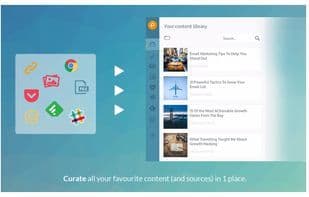
Publicate makes creating powerful email newsletters and weekly web digests as easy as drag and drop. The content library connects to all your favorite sources like RSS, Feedly, Pocket, Slack, Cronycle, and more, so you can automatically build and organize a repository of great content whenever you need it.
The editor allows you to drag and drop content from your library into any publication, and we’ve added customization features like call-to-action buttons, dividers, headers, social sharing, and social follow options. It even remembers any styles and colors you’ve used, so you can save time by selecting from existing designs instead of recreating them.
You can also save templates, duplicate publications, or even convert emails into web content—turning newsletters into blog posts and vice versa. Finally, everything you create in Publicate can be exported as mobile-responsive HTML, ensuring seamless compatibility with tools you already use, such as Mailchimp, Campaign Monitor, WordPress, Ghost.io, or even Gmail and Outlook.
How to use Publicate?
Publicate is a drag-and-drop email newsletter and weekly web digest creation tool that helps users automatically curate content from various sources and easily design, export mobile-responsive HTML for seamless integration with existing tools.
Core Functions of Publicate
Blog editing
Content curation
Usage Scenarios of Publicate
- Create professional email newsletters
- Create weekly web content summaries
- Convert email content into blog posts and vice versa
- Automatically collect and organize content from RSS, Feedly, Pocket, etc.
- Quickly crop and adjust images, and search for royalty-free images
- Rapidly produce newsletters without design or developer assistance
Common Questions about Publicate
What does Publicate do?
How do I use Publicate?
What are the core features of Publicate?
What are the use cases for Publicate?



















