




Product Information
What is Syncplay?
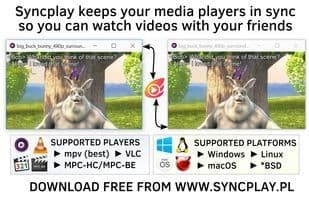
Syncplay enables people to enjoy shared viewing experiences even when miles apart, allowing friends to watch anime, movies, TV shows, and other media together. The Syncplay client launches a media player on your computer, connects to a Syncplay server, and joins a virtual room on that server. Pauses, unpauses, and seeks performed in that media player instance are relayed through the server to other viewers, enabling their media players in the same virtual room to replicate these actions. The server keeps track of everyone's position in the video, so if someone joins, they can be brought to the correct spot, and if someone gets too far ahead, synchronization can be restored.
Compatible players: mpv, MPC-BE, MPC-HC, VLC
Languages: English, German, Russian, Italian
Platforms: Windows, Linux, *BSD, macOS
License: Apache 2.0
Cost: Free
How to use Syncplay?
Syncplay is free software that synchronizes video playback across multiple media players, allowing friends, family, or partners in different locations to watch movies, TV shows, anime, and other media together for a shared viewing experience.
Core Functions of Syncplay
Watch videos together, built-in chat, no registration, no ads, supports 4K
Usage Scenarios of Syncplay
- Watch movies, TV shows, or anime with friends and family from afar.
- Use the youtube-dl tool to watch YouTube videos in sync with others.
- Use direct URLs to watch content on anime streaming sites with friends.
- Sync video playback while on a voice call (e.g., Mumble or Skype) for a shared viewing experience.
Common Questions about Syncplay
What does Syncplay do?
How do I use Syncplay?
What are the core features of Syncplay?
What are the use cases for Syncplay?



















