




Product Information
What is Asisteclick?
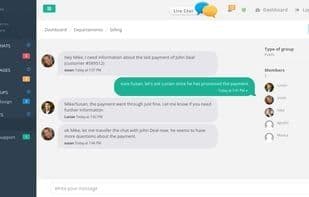
Messenger for Business—Boost sales and improve customer support with real-time chat across three products: Team (collaborate with teammates), Chat (real-time chat with customers), and Inbox (ticketing system).
Proactive Chat: Set up smart chat invitations that automatically trigger based on visitor behavior.
Transcripts: Review every chat log. Audit operator performance and identify new business opportunities.
Canned Messages: Save time by using shortcuts for common questions and storing answers in a database.
Chat Transfer: Easily transfer chats to another operator, support tier, or supervisor, just like a phone call.
Team Collaboration: Chat with other members of your company and collaborate seamlessly.
Multilingual: Currently supports visitor chat windows in 9 languages: English, Spanish, Portuguese, French, German, Italian, Dutch, Turkish, and Danish.
Fixed and Floating Buttons: Place chat buttons in fixed positions on your webpage or let them float in any corner of the visitor's browser.
Capture Screenshots: A picture is worth a thousand words. Take screenshots of visitors' screens to understand exactly what support they need.
Sound and Visual Chat Alerts: Never miss a lead. Visual and sound alerts trigger whenever a new chat support request comes in.
Custom Design: Change chat window colors to match your company branding. Upload your company logo and customize online/offline buttons.
File Sharing: Easily transfer files between operators and visitors. Share documents, contracts, images, PDFs, and any other file type.
Secure Connection: Chat sessions and the admin dashboard are secured with 256-bit SSL certificates.
Smartphone-Ready: Visitor chat windows automatically adjust when accessed via smartphones or tablets.
Unlimited Users and Agent Seats: Plans include unlimited users and agent seats.
Integrate Customer Support Emails: Combine customer support emails with a shared inbox.
Assign Tickets to Agents and Departments: Easily distribute tickets to agents or entire departments.
Convert Emails into Conversations: Seamlessly turn emails into chat conversations.
How to use Asisteclick?
AsisteClick is a business instant messaging tool designed to help companies boost sales and enhance customer support through real-time chat, team collaboration, and a ticketing system.
Core Functions of Asisteclick
Help desk ticketing
Real-Time Customer Service Chat
Team collaboration
Team messaging
Team collaboration
Website real-time chat
Usage Scenarios of Asisteclick
- Chat in real-time with visitors to provide instant customer support.
- Collaborate and communicate among team members.
- Manage and assign customer support requests via a ticketing system.
- Automatically send chat invitations based on visitor behavior to boost sales.
- Integrate customer support emails into a shared inbox and convert them into conversations.
- Audit support staff performance and identify new business opportunities.
Common Questions about Asisteclick
What does AsisteClick do?
How do I use AsisteClick?
What are the core features of AsisteClick?
What are the use cases for AsisteClick?



















