




Product Information
What is Asset management?
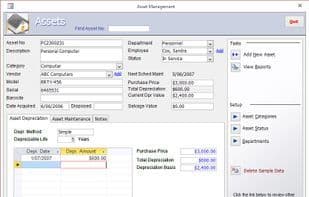
The Asset Management Database is a Microsoft Access database designed to help small and medium businesses record and track business assets, including descriptions, acquisition and disposal details, and repair costs. It also tracks asset locations, sets maintenance schedules, and records depreciation values for tax purposes. The free version is fully functional; redesign services are available for enhanced features or custom reports.
How to use Asset management?
Asset Management is a Microsoft Access-based database designed to help small and medium-sized businesses record and track their business assets, including acquisitions, disposals, repairs, locations, maintenance schedules, and depreciation, enabling comprehensive asset management and tax reporting assistance.
Core Functions of Asset management
Asset Management
Usage Scenarios of Asset management
- Record and track the acquisition, disposal details, and related maintenance costs of business assets.
- Track the current location of business assets, including those assigned to employees.
- Set up asset maintenance schedules and retain all repair or service details.
- Use the built-in depreciation calculator to compute annual tax depreciation amounts and generate depreciation reports to assist with tax filings.
- Document detailed asset descriptions, such as manufacturer, model, serial number, barcode, and asset category.
- Link purchase receipts, manuals, and other electronic documents to asset records and generate reports listing assets assigned to departments or employees.
Common Questions about Asset management
What does Asset Management do?
How do I use Asset Management?
What are the core features of Asset Management?
What are the use cases for Asset Management?



















