




Product Information
What is Camunda modeler?
Camunda Modeler is a user-friendly desktop application that enables developers to design and deploy automation processes, human workflows, decision tables, and decision requirement diagrams using globally recognized BPMN and DMN standards. The Modeler makes it easy for developers to prepare BPMN process models or DMN decision tables for execution by editing properties, configuring error handling, and adding custom code. The Modeler works directly on BPMN 2.0 and DMN 1.3 XML files, so it integrates with IDEs, source code repositories, and other tools that are part of a developer's toolkit. Reusable BPMN task templates eliminate rework and help low-code developers automate processes faster with fewer errors. Templates can capture domain-specific functionality, promoting reuse across projects and speeding up the delivery of automated processes to the business. The Modeler is fully integrated with the Cawemo catalog, where templates are easily managed and shared among teams. Create user task forms in minutes with an easy-to-use drag-and-drop interface designed for all types of developers, from low-code to professional software engineers. You can deploy forms to Camunda’s 'out-of-the-box' web app Tasklist for human work or leverage the open-source Form-JS library. With the library, it's easy to blend forms created in the Modeler with custom forms in your own frontend apps. Thanks to the Camunda community, a variety of open-source plugins are available to help you customize the Modeler and extend its functionality. Popular Modeler plugins include BPMN token simulation, transaction boundary visualization, technical tooltips, and more. Additionally, the BPMN.IO project provides powerful open-source, web-based tools for modeling BPMN, DMN, and user task forms.
How to use Camunda modeler?
Camunda Modeler is a desktop application designed to help developers design and deploy automated processes, manual workflows, decision tables, and decision requirement diagrams, supporting BPMN and DMN standards to foster collaboration between technical and non-technical personnel.
Core Functions of Camunda modeler
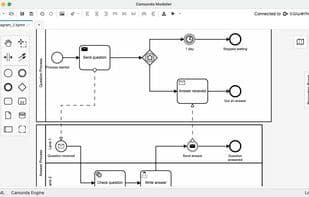
BPMN diagram
BPMN diagram
Usage Scenarios of Camunda modeler
- Design and deploy automated processes
- Design and deploy manual workflows
- Prepare BPMN process models or DMN decision tables for execution
- Accelerate process automation with reusable BPMN task templates
- Create user task forms using a drag-and-drop interface
- Customize and extend modeler functionality with open-source plugins
Common Questions about Camunda modeler
What does Camunda Modeler do?
How do I use Camunda Modeler?
What are the core features of Camunda Modeler?
What are the use cases for Camunda Modeler?



















