




Product Information
What is Chameleon miner?
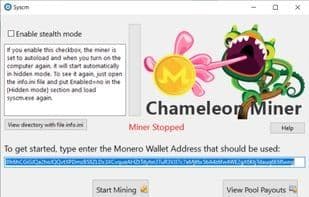
Chameleon Miner is a free, covert cryptocurrency mining program specifically tailored for discreet mining of Monero (XMR). This software can mine on all Windows devices and directly transfers the mined cryptocurrency to a chosen wallet. Initially, the mined Monero is stored in the third-party mining pool moneroocean.stream before being transferred to your wallet. Chameleon Miner utilizes both CPU and GPU for mining and can be concealed within another process (such as Microsoft Edge) for stealthy operations.
The software ensures optimal load balancing by continuously monitoring system resources to prevent computer overload. It features an "Enable Stealth Mode" option, which, when activated, sets the miner to automatically load upon system startup. The mining program operates covertly, remaining invisible in the taskbar or system tray, and resumes mining after system reboots without requiring user intervention. This is achieved by modifying the "info.ini" file (setting Enabled=yes under the [Stealth Mode] section).
To halt the mining program's startup operation, disable it by changing the setting in the [Stealth Mode] section of the "info.ini" file to Enabled=no, then reload syscm.exe. Mining progress can be verified by checking the logs on moneroocean.stream and entering the wallet address used for mining. After initiating mining, the pool statistics may take 5-7 minutes to update.
How to use Chameleon miner?
Chameleon Miner is a free covert cryptocurrency mining software designed to secretly mine Monero (XMR) on Windows devices, transferring mined cryptocurrency directly to the user's specified wallet.
Core Functions of Chameleon miner
Mining pool
Data mining
Cryptocurrency mining
Usage Scenarios of Chameleon miner
- Mine Monero (XMR) stealthily on all Windows devices
- Hide mining processes within other applications, such as Microsoft Edge
- Enable persistent background mining via auto-start on boot
- Automatically monitor system resources to optimize load and prevent overloading
Common Questions about Chameleon miner
What does Chameleon Miner do?
How do I use Chameleon Miner?
What are the core features of Chameleon Miner?
What are the use cases for Chameleon Miner?



















