




Product Information
What is Go mail merge?
Easily schedule multiple email campaigns and quickly, securely automate your email follow-up sequences. Go Mail Merge is the most advanced mail merge add-on for Gmail.
Enjoy a fully functional free trial for one month after installation.
Exclusive features:
- Schedule up to 5 email campaigns simultaneously.
- Email sequences with up to 4 follow-up emails per campaign.
- Personalized attachments with single-line text.
- Cancel email campaigns anytime.
- No artificial rate limits.
- Limit the number of emails sent per day.
- Staggered email delivery to make emails appear as if sent by a person.
- Short tracking URLs with the highest deliverability rates.
- Unsubscribe links.
- The most accurate email status tracker (read, bounced, clicked, unsubscribed).
- Easily add personalized attachments from Google Drive—actual files, not just links.
- Easily add static attachments from Google Drive—actual files, not just links.
- Send emails from aliases.
- Product support via email 16 hours a day, 7 days a week—directly with the creator.
- Organized Gmail labels nested under the Go Mail Merge label.
- Import all Google contacts with a single click.
Deliver bulk emails straight to the primary inbox. Achieve higher open rates for all Gmail recipients.
Track opens, link clicks, bounces, responses, and failed deliveries in real-time directly from Google Sheets.
Automated email follow-up sequences ensure no bounced emails, replies, or unsubscribes during the campaign.
**How to get started:**
After installing Go Mail Merge:
1. Draft your email in Gmail using template variables (e.g., `{{first name}}`).
2. Create a contact list in Google Sheets and add personalized columns based on your email template.
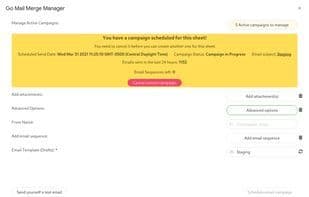
3. Launch Go Mail Merge via the add-on menu, send a test email to verify appearance, and initiate your campaign to send all personalized emails in minutes.
How to use Go mail merge?
Go Mail Merge is a Gmail plugin for mail merging, helping users easily schedule multiple email campaigns and automate follow-up sequences for high deliverability and personalized outreach.
Core Functions of Go mail merge
Email merge
Usage Scenarios of Go mail merge
- Automate cold email marketing.
- Manage and send marketing email campaigns.
- Personalize email sending at scale.
- Track email opens, clicks, and replies.
- Set up automated email follow-up sequences.
Common Questions about Go mail merge
What does Go Mail Merge do?
How do I use Go Mail Merge?
What are the core features of Go Mail Merge?
What are the use cases for Go Mail Merge?



















