




Product Information
What is Mailswift?
MailSwift is an application designed to help you send newsletters and promotional emails to your subscribers at a cost 10 times cheaper through your Amazon SES account. Its features include:
Drag-and-Drop Editor
MailSwift comes with an easy-to-use editor featuring controls you're already familiar with. No need to learn complex layouts or understand custom formatting. Simply launch the editor and create beautifully rich-text emails that your audience will love.
Powerful Tracking Capabilities
Amazon SES offers robust email tracking to monitor the performance of your campaigns. MailSwift automatically handles the complex configurations, ensuring all emails sent through the app are properly tracked.
Built-In Easy List Cleaning
MailSwift helps reduce bounce rates, thereby maintaining your domain's sender reputation. Beyond uploading suppression lists, you can specify options to exclude emails sent to high-bounce domains or non-existent TLDs. MailSwift also filters out duplicate and invalid email addresses.
Email Personalization with Mail Merge
Various surveys and studies show that personalized emails achieve higher open and click-through rates. Thus, MailSwift enables you to use mail merge tags in your emails, giving them a personalized touch.
Custom Templates
Do all your emails have branded marketing templates? Just open the HTML editor, paste your template code, and you're set. You can even edit everything without having to revert to HTML editing.
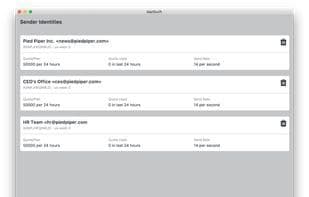
Multiple Sender Identities
You can use any email address you own as the sender for your campaigns. MailSwift makes it incredibly easy to add, verify, and manage multiple sender identities. This is especially useful if you're sending on behalf of clients or wish to use different identities for various purposes.
How to use Mailswift?
Mailswift is an application that helps users send newsletters and promotional emails to subscribers at a lower cost via Amazon SES accounts. It aims to simplify email marketing campaigns and offers robust tracking and personalization features.
Core Functions of Mailswift
Email Template Editor
Email list cleaning
Email analysis
Email merge
Usage Scenarios of Mailswift
- Send newsletters and promotional emails to subscribers.
- Maintain domain sender reputation with list cleaning to reduce bounces.
- Use mail merge tags for personalized emails to improve open and click rates.
- Create branded marketing emails with custom HTML templates.
- Manage and use multiple sender identities for different email purposes.
Common Questions about Mailswift
What does Mailswift do?
How do I use Mailswift?
What are the core features of Mailswift?
What are the use cases for Mailswift?



















