
Product Information
What is Wpchimp?
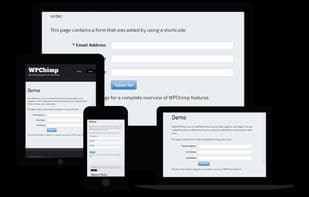
With WPChimp, you can create signup forms for any MailChimp email list and publish them on your WordPress-powered site.
You don't need technical skills to use our forms; configuration is all done via drag-and-drop with a live preview.
The forms you generate are responsive and work out of the box on any device.
You also get six color schemes and three layouts, so you can create the perfect form for your site.
No matter how many email lists you have, you can create forms for any of them—or even different forms for the same list. You can even mix forms on the same page.
Using forms is as easy as creating them; you can add them to your site using shortcodes or widgets.
Technical users or theme developers can use template tags for finer-grained control over forms.
How to use Wpchimp?
WPChimp offers MailChimp email list registration form creation tools for easy publishing of responsive forms on WordPress sites. It also serves as a resource site for WordPress, blogging, and SEO tutorials and tips.
Core Functions of Wpchimp
Mailchimp Integration
Usage Scenarios of Wpchimp
- Create a custom registration form for a MailChimp mailing list.
- Publish a responsive email signup form on a WordPress site.
- Easily configure forms with a drag-and-drop interface and preview in real-time.
- Create different styled forms for the same mailing list or mix them on the same page.
- Get practical tutorials and how-tos on WordPress, blogging, and SEO.
- Find reviews and recommendations for WordPress themes, plugins, or writing tools.
Common Questions about Wpchimp
What does WPChimp do?
How do I use WPChimp?
What are the core features of WPChimp?
What are the use cases for WPChimp?