




Product Information
What is Adb appcontrol?
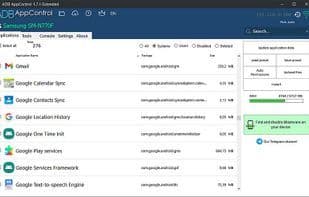
ADB AppControl - A new, convenient desktop program that allows you to easily manage applications on your Android device. You can disable unwanted pre-installed system apps and outdated software, or install new applications and legacy software using a modern graphical interface. The program includes numerous useful tools and tweaks to enhance your device experience. This is precisely the tool you'll use for years to come—after trying ADB AppControl, you'll find handling apps via adb has never been simpler.
How to use Adb appcontrol?
ADB AppControl is a desktop program designed to simplify Android app management. Its modern GUI helps users disable pre-installed apps, uninstall bloatware, or install new apps to improve device experience.
Core Functions of Adb appcontrol
Lightweight
Dark Mode
Ad-Free
No Registration Required
Wireless network
Android development
Usage Scenarios of Adb appcontrol
- Disable unwanted pre-installed system apps and bloatware on Android devices.
- Batch install or manage apps on Android devices via a graphical interface.
- Automate routine tasks like batch app installation, using presets, and process management.
- Simplify device management for Android developers, QA engineers, and power users.
- Take screenshots, change screen resolution, or hide status bar icons.
- Save and load app list presets.
Common Questions about Adb appcontrol
What does ADB AppControl do?
How do I use ADB AppControl?
What are the core features of ADB AppControl?
What are the use cases for ADB AppControl?




















