




Product Information
What is Apple business manager?
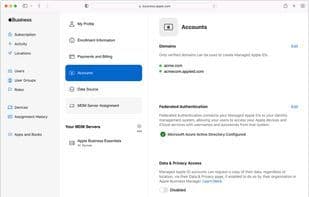
Authentication - Link to your Google Workspace, Microsoft Active Directory (Azure AD) domain, or identity provider, and use federated authentication for user accounts and verification.
Managed Apple IDs: Apple Business Manager makes it easy to create unique Managed Apple IDs for each user in your organization. Managed Apple IDs are exclusive to your organization and separate from personal Apple IDs you might create for yourself. The benefit is that IT administrators can control which services Managed Apple IDs can access. Additionally, since Apple Business Manager integrates with your existing environment, you can provide Managed Apple IDs to employees using their existing organizational credentials—such as those from Google Workspace, Microsoft Azure Active Directory (Azure AD), or your identity provider (IdP). You can integrate federated authentication or a System for Cross-domain Identity Management (SCIM), allowing users to sign in to Apple services with their existing usernames and passwords.
Devices - Simplify how you deploy Apple devices across your organization.
Automated Device Enrollment:
With Apple Business Manager, you can automate MDM enrollment and streamline initial device setup without physically handling or preparing devices before users receive them. Devices can be automatically enrolled in your chosen MDM solution as long as they were added to your organization at purchase—whether from Apple, participating Apple Authorized Resellers or carriers, or via Apple Configurator.
Content - Purchase apps and books in bulk, then assign them to devices for employee use. You can also reassign apps from one device to another.
Purchasing Apps and Books: Apple Business Manager works with your MDM solution, enabling your organization to buy content—such as apps and books—in bulk, assign it to devices or users, and install or update that content over the air, even if the App Store is disabled. You retain full ownership and control over purchased apps. You can even revoke apps and reassign them to different devices and users—in any country or region where the app is available on the App Store.
How to use Apple business manager?
Apple Business Manager is a tool designed to assist businesses in managing Apple devices, authenticating user identities, and purchasing and distributing apps and books in bulk, aiming to streamline the deployment and management processes of Apple products within enterprises.
Core Functions of Apple business manager
Two-Factor Authentication
Mobile Device Management
Usage Scenarios of Apple business manager
- Link existing Google Workspace, Microsoft Azure AD, or identity providers to Apple Business Manager for federated authentication.
- Create and manage unique managed Apple IDs for each user in the organization.
- Automate MDM enrollment for Apple devices, simplifying initial setup without physical access.
- Bulk purchase apps and books, assigning them to employee devices or users.
- Reassign purchased apps across devices and users.
- Wirelessly install and update enterprise apps and books even with App Store disabled.
Common Questions about Apple business manager
What does Apple Business Manager do?
How do I use Apple Business Manager?
What are the core features of Apple Business Manager?
What are the use cases for Apple Business Manager?



















