




Product Information
What is Apple school manager?
Apple School Manager is a simple web-based portal for IT administrators that works with your third-party mobile device management (MDM) solution, enabling you to easily purchase content in bulk, whether your organization uses iPhone, iPad, or Mac.
Consolidate Your Data – Synchronize user accounts from your Student Information System, Google Workspace, Microsoft Active Directory (Azure AD) domain, or identity provider, or with files you create and upload using SFTP.
Integrate with Your Student Information System (SIS)
This allows you to quickly create user accounts with school rosters and classes, and Apple School Manager can also integrate with your existing environment.
Managed Apple IDs
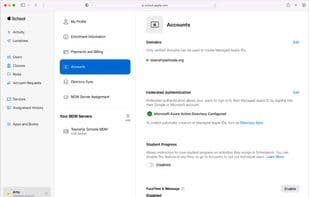
Apple School Manager makes it easy to create unique Managed Apple IDs for every user in your organization. Managed Apple IDs are exclusive to your organization and separate from the personal Apple IDs users might create for themselves. The benefit is that IT administrators can control which services the Managed Apple IDs can access. Additionally, since Apple School Manager integrates with your existing environment, you can provide users with Managed Apple IDs using their current organizational credentials—such as those from Google Workspace, Microsoft Azure Active Directory (Azure AD), or your identity provider (IdP). You can also integrate federated authentication or a cross-domain identity management system (SCIM), allowing users to log in to Apple services with their existing usernames and passwords.
Devices – Simplify how you deploy Apple devices across your organization.
With Apple School Manager, you can automate MDM enrollment and streamline initial device setup without needing to physically handle or prepare devices before users receive them. Devices can be automatically enrolled in your chosen MDM solution as long as they were added to your organization at the time of purchase—whether from Apple, an authorized Apple reseller or mobile carrier, or via Apple Configurator.
Content – Purchase apps and books in bulk and assign them to devices used by your staff, teachers, and students. You can also reassign apps from one device to another. Apple School Manager works with your MDM solution to allow your organization to buy content—such as apps and books—in bulk, assign it to devices or users, and then install and update that content over the air, even if the App Store is disabled. You retain full ownership and control over purchased apps. You can even revoke an app and reassign it to a different device or user—in any country or region where the app is available on the App Store.
How to use Apple school manager?
Apple School Manager is a web-based portal designed to help IT administrators streamline Apple device deployment and bulk content procurement, working alongside third-party mobile device management (MDM) solutions. It enables educational institutions to efficiently manage iPhone, iPad, or Mac devices and their content.
Core Functions of Apple school manager
Mobile Device Management
Usage Scenarios of Apple school manager
- Sync user account data from student information systems, Google Workspace, Microsoft Active Directory, etc.
- Quickly create user accounts with school rosters and classes by integrating with existing environments.
- Create unique managed Apple IDs for each user in the organization and manage their service access.
- Automate MDM enrollment and simplify initial setup for Apple devices without physical contact.
- Bulk purchase apps and books and assign them to faculty and students.
- Revoke and reassign apps to different devices and users.
Common Questions about Apple school manager
What does Apple School Manager do?
How do I use Apple School Manager?
What are the core features of Apple School Manager?
What are the use cases for Apple School Manager?



















