




Product Information
What is Chromatic?
Chromatic is a visual testing and review tool that scans every possible UI state in browsers to catch visual and functional errors. Assign reviewers and resolve discussions to streamline team sign-offs.
**UI Testing Automatically Catches Errors**
Run visual and interactive tests across different browsers, themes, and viewports simultaneously. Extensive test coverage—no extra effort required.
- **Test in Real Browsers:** Chromatic captures pixel-perfect snapshots of real code, styles, and assets. Your tests reflect the actual user experience.
- **Low Maintenance, High Coverage:** Chromatic creates tests based on Storybook stories already built during development. No need to write the same test twice.
- **No Flaky Tests:** Our custom detection algorithms eliminate instability caused by delays, animations, resource loading, and browser states.
**Scan All Possible UI States to Pinpoint Regressions**
Run two types of tests across four browsers for continuous coverage. By default, your tests run in parallel to deliver results in the shortest time possible.
**UI Reviews Speed Up Team Sign-Offs**
Chromatic provides designers, product managers, and other stakeholders with a unified workspace to share feedback and approve UIs. It’s like code review—but for everyone.
- **Stay on Top of Feedback:** Get notified of changes and discussions via email and pull request checks.
- **Centralize Every Decision:** Post comments and change requests alongside live components so everyone can follow decisions.
- **Integrate with Git & CI:** UI review status syncs with version control and CI, keeping teams informed.
- **Assign Reviewers:** Request reviews from design, product, and engineering teams in an online shared workspace.
- **Set Default Reviewers:** Automatically assign specific stakeholders to review open pull requests for faster sign-offs.
- **Connect to Your Workflow:** Keep everyone in the loop via Slack, Figma, and custom webhooks.
**Publish a Single Source of Truth**
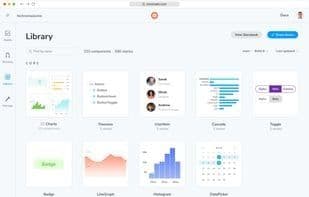
Create a searchable workspace for UI components, stories, tests, API documentation, and design files. Invite your team to a shared workspace where they can reference any UI element across time.
- **Catalog All Components:** Explore your company’s entire UI component library in one place—no need to dig through repositories.
- **Stay Up to Date:** Your library updates automatically every time you push code.
- **Searchable Component Library:** Understand how and where UI components are used in projects.
- **Component APIs, Docs & Examples:** Documentation, APIs, and sample use cases from Storybook sync with Chromatic and display alongside components.
- **Invite Your Team:** Extend invites to developers, designers, and stakeholders via email or custom links. Assign access control roles.
- **History by Commit:** Compare components across branches and commits to view past versions.
How to use Chromatic?
Chromatic is a visual testing and review tool that scans all possible UI states across browsers to catch visual and functional bugs automatically, offering a unified workspace to streamline UI sign-offs for teams.
Core Functions of Chromatic
Ad-Free
Debugging
Webhook integration
Webhook support
UI design
Visual UI Testing
Usage Scenarios of Chromatic
- Run visual, accessibility, and interaction tests across different browsers, themes, and viewports, automatically capturing UI errors
- Designers, product managers, and stakeholders share UI feedback and approvals in a unified workspace
- Create a searchable UI component library with components, stories, tests, API docs, and design files
- Compare components across branches and commits, review historical UI versions
- Find how and where UI components are used in projects
Common Questions about Chromatic
What does Chromatic do?
How do I use Chromatic?
What are the core features of Chromatic?
What are the application scenarios for Chromatic?



















