




Product Information
What is Connection list?
Ad-free, no root required!
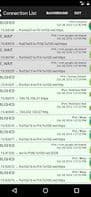
This app graphically displays (real-time capture) and tracks all current internet (IPv4 and IPv6) connections on your phone/tablet. It reads data from the same place as the famous netstat tool (network statistics/internet connection monitor) but offers a tracking mode as a small, efficient background service with minimal CPU and power usage. Plus: Export all data as a CSV file to Excel or LibreOffice.
With this tool, you can monitor which apps connect to the internet: when, how often, and to which servers... You can also check for listening network sockets (open ports/servers) on your device. Spyware, malware, and other connection-heavy apps will be exposed.
Fields available in the real-time network monitor and export file:
Local IP/hostname
Remote IP/hostname
Resolved internet hostnames (if enabled)
Connection—status (tap for details)
Time of connection creation/change
IPv4/IPv6
App name and icon
Options:
Enable/disable hostname resolution
Enable/disable tracking
Sort by time, connection status, or app ID
Export list as CSV file (Pro feature)
Run this app as a background service to track connections and quickly view open connections in the notification area.
How to use Connection list?
Connection List is a real-time network monitoring tool for phones/tablets that displays and tracks all internet connections, helping users understand app network activity and detect potential malware.
Core Functions of Connection list
Network Tools
Usage Scenarios of Connection list
- View all internet connections on your phone/tablet in real time.
- Monitor when, how often, and to which servers each app connects.
- Check for listening network sockets (open ports/servers) on your device.
- Identify and expose spyware, malware, or other anomalous network behaviors.
- Export network connection data as CSV files for analysis in Excel or LibreOffice.
- Run as a background service to continuously track connections and quickly view open connections in the notification area.
Common Questions about Connection list
What does Connection list do?
How do I use Connection list?
What are the core features of Connection list?
What are the application scenarios of Connection list?



















