




Product Information
What is Diffpdf?
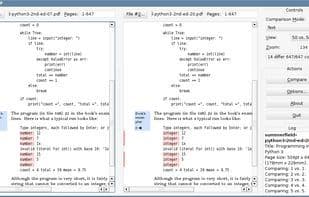
DiffPDF can compare two PDF files. It offers two comparison modes: text and appearance.
By default, it compares text on each page, but it also supports comparing page appearances (e.g., if diagrams change or paragraphs are reformatted). Specific pages or page ranges can also be compared. For example, if one PDF version has pages 1-12 and another has 1-13 with an extra page added as page 4, you can compare them by specifying the ranges: first version 1-12, second version 1-3, 5-13. This will align pages (1,1), (2,2), (3,3), (4,5), (5,6), etc., ending with (12,13).
How to use Diffpdf?
Diffpdf is a PDF comparison tool that checks two PDF files in text or appearance modes, helping users spot differences between documents.
Core Functions of Diffpdf
Comparative text analysis
Usage Scenarios of Diffpdf
- Compare text differences between two PDF files.
- Check if charts in PDF files have been modified.
- Verify if paragraph formatting in PDF files has been reformatted.
- Compare different versions of PDF files with varying page counts or inserted pages.
- Compare specific pages or page ranges in PDF files.
Common Questions about Diffpdf
What does Diffpdf do?
How do I use Diffpdf?
What are the core features of Diffpdf?
What are the use cases for Diffpdf?



















