




Product Information
What is Flux?
Flux is highly praised for its ability to reduce eye strain and improve sleep quality by adjusting the screen's color temperature according to the time of day. Users appreciate its simplicity and effectiveness, noting enhanced well-being and reduced eye fatigue. While some believe it could benefit from updates, many have integrated it into their daily routines, highlighting its significant role in enhancing digital experiences and prioritizing health. Overall, Flux is valued for its practical impact on user comfort and sleep.
How to use Flux?
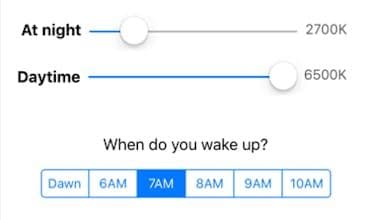
Flux is a software that reduces blue light by automatically adjusting screen color temperature based on time, alleviating eye strain and improving sleep quality. It aims to optimize digital device usage while prioritizing user health.
Core Functions of Flux
Automatically adjust screen color temperature based on time
Reduce harsh blue light
Alleviate eye strain
Improve sleep quality
Adapt computer screen to indoor lighting
Usage Scenarios of Flux
- Using computers or phones for extended periods at night.
- Using electronic devices before bedtime.
- Alleviate eye strain and headaches caused by blue light from screens.
- Improve nighttime sleep quality.
- Enhance the daily digital device experience.
Common Questions about Flux
What does Flux do?
How do I use Flux?
What are the core features of Flux?
What are the application scenarios for Flux?



















