




Product Information
What is Hyper-v switch?
Hyper-V is Microsoft's virtualization solution that can be installed alongside Windows. The Visual Studio device emulator for Windows 10 Mobile relies on Hyper-V as the guest system. While this may work in most cases, its primary drawback is that Hyper-V runs permanently once installed, unlike application hypervisors such as VMware or VirtualBox. When the Hyper-V hypervisor is already active, these other virtualization solutions will not function properly—for instance, 64-bit support becomes unavailable, and performance degrades because VT-x CPU hardware extensions are inaccessible within the VM guest (the entire Windows desktop will be affected). Hyper-V significantly interferes with other virtualization applications when using Android device emulators or other VM solutions for different tasks.
How to use Hyper-v switch?
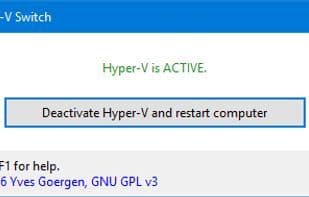
Hyper-V Switch provides a simple graphical interface to enable or disable Hyper-V, avoiding conflicts with other virtualization solutions like VMware or VirtualBox, and allowing simultaneous use of these different virtualization platforms.
Core Functions of Hyper-v switch
Virtualization
Usage Scenarios of Hyper-v switch
- When needing to use Hyper-V alongside other virtualization software (e.g., VMware or VirtualBox) on the same Windows PC.
- Developers needing to use Android device emulators or other VM solutions for development, but Hyper-V is running and causing conflicts.
- Avoid missing 64-bit support or performance degradation due to Hyper-V running continuously.
Common Questions about Hyper-v switch
What does Hyper-V Switch do?
How do I use Hyper-V Switch?
What are the core features of Hyper-V Switch?
What are the application scenarios of Hyper-V Switch?















