




Product Information
What is Linqpad?
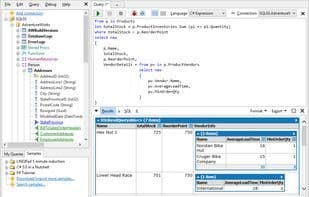
LINQPad lets you interactively query SQL databases using the modern query language LINQ. Say goodbye to SQL Management Studio! LINQPad supports everything in C# 3.0 and Framework 3.5:
LINQ to Objects
LINQ to SQL
Entity Framework
LINQ to XML
(and even old-school SQL!) LINQPad is also a great way to learn LINQ: it comes preloaded with 200 examples from the book *C# 3.0 in a Nutshell*. There's no better way to experience the power of LINQ and functional programming. LINQPad isn't just for LINQ: it's a highly ergonomic snippet IDE that instantly executes any C#/VB expression, statement block, or program—the ultimate tool for dynamic development. Stop cluttering your source folders with hundreds of Visual Studio console projects!
How to use Linqpad?
LINQPad is an interactive development environment for C#, F#, and VB code, allowing users to instantly test code snippets, expressions, or programs and query various databases using LINQ or SQL. It aims to provide a lightweight, dynamic platform for learning and developing with LINQ, replacing cumbersome Visual Studio console projects.
Core Functions of Linqpad
Lightweight
.NET Core Support
.NET Framework
Multi-database
Usage Scenarios of Linqpad
- Interactively query SQL databases using LINQ or SQL.
- Learn LINQ with 200 preloaded examples for practice.
- Instantly test C#, F#, or VB code snippets, expressions, or programs.
- Replace Visual Studio console projects to avoid file clutter.
- Prototype ideas in LINQPad and then paste the code into Visual Studio.
- Cache intermediate data, edit, and rerun queries without recalculating.
Common Questions about Linqpad
What does LINQPad do?
How do I use LINQPad?
What are the core features of LINQPad?
What are the use cases for LINQPad?



















