



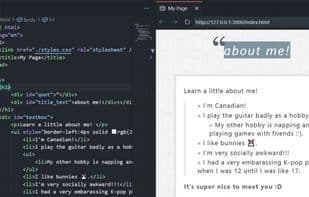

Product Information
What is Live preview?
An extension for hosting a local server to preview your web projects!
This extension is most useful for projects that haven't yet set up a server (e.g., not suitable for apps using React, Angular, etc.). For those, feel free to use VS Code's built-in Simple Browser: Show command.
Features:
- **HTML File Preview**: Quickly preview HTML files by clicking the preview button in the top-right corner of the editor or using the context menu.
- **Embedded Preview**: View server-hosted files directly within the editor.
- **Live Refresh**: See changes in real time. By default, updates appear as you edit. You can also adjust this in the extension settings to refresh on save or disable auto-refresh.
- **Persistent Server Task with Logging**: Need a long-running server? Use the Live Preview task, which also logs server traffic.
- **External Browser Preview**: While the images above show the embedded browser, you can also enjoy the same features in an external browser.
- **External Browser Debugging**: External previews support debugging via the built-in js-debug extension and can attach to the Edge DevTools extension, enabling features like breakpoints and element inspection.
- **Console Output (for Embedded Preview)**: To view console messages from the embedded preview, go to the Output tab and select "Embedded Live Preview Console" from the dropdown.
- **Workspace-Free Preview**: No workspace? No problem! The server can also preview files outside your workspace for quick checks.
- **Multi-Root Support**: Live Preview works seamlessly with multi-root workspaces! It opens just one additional server per root where you launch a preview.
How to use Live preview?
Live Preview is an extension that hosts a local server in the workspace to preview web projects. Its core value lies in providing fast, real-time web previews for projects that have not yet set up a server.
Core Functions of Live preview
Work Offline
Real-Time Preview
No Registration Required
Ad-Free
VSCode
Visual editing
Usage Scenarios of Live preview
- Quickly preview HTML files by clicking the preview button in the editor or using the context menu.
- View real-time modifications to webpage content while editing code.
- Run a persistent server task and log server traffic.
- Preview webpages in an external browser with support for debugging via built-in extensions (e.g., setting breakpoints and inspecting elements).
- Quickly preview files outside the workspace without a workspace.
- Preview multiple projects simultaneously in a multi-root workspace.
Common Questions about Live preview
What does Live Preview do?
How do I use Live Preview?
What are the core features of Live Preview?
What are the application scenarios for Live Preview?



















