




Product Information
What is Netadmin?
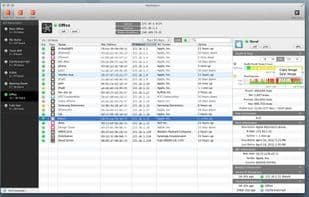
NetAdmin is a fully automated, powerful monitoring tool that continuously provides various information about your connected local network.
In your office or at home, numerous devices are connected to the local network. Some may be tightly controlled, while others may not. Some networks might consist of general-purpose computers and printers, while others could be Wi-Fi networks with mobile devices. NetAdmin allows you to automatically discover all devices connected to the local network in any environment without requiring a separate monitoring server. The tool also collects information and continuously manages and monitors connection history and data. The key features of NetAdmin include:
- Independent data collection on iMac or MacBook
- Fully automated operation
- Simple UI providing essential information for local network management
- Host status graphs for different time periods (90 minutes to 1 year)
- Network and host status reports (PDF, print), export via CSV
- Additional features such as MIB browser (SNMP v1/v2, keyword search, export via text/CSV)
- Configurable icons and names for each device
- Wake-on-LAN
The primary information provided by NetAdmin includes:
- Up/Down status of each host (with graphs)
- Ping response times (with graphs)
- NetBIOS, Bonjour, MDNS, UPNP information
- Port scanning and launching applications with open ports
- NIC vendor country/company (with OUI DB update capability)
- Public IP assignment history
- IP assignment history for each host
- Connection network history per host
- Wi-Fi information of connected networks
- SNMP walk information on the network
- Host type analysis: Windows, Linux/Unix, Mac OSX, mobile devices, network printers, VOIP phones
Additional features—such as Bonjour service management, iPhone/iPad integration, and SNMP/port scanning graphs—will be available in the future.
How to use Netadmin?
NetAdmin is a powerful, fully automated network monitoring tool that continuously provides various information about connected local networks, automatically discovering, managing, and monitoring all devices.
Core Functions of Netadmin
Network Scanner
Usage Scenarios of Netadmin
- Monitor local network devices in offices or homes.
- Automatically discover all devices connected to the local network.
- Continuously manage and monitor device connection history and information.
- Easily find hosts on the network and their details.
- Analyze host types, such as Windows, Linux/Unix, Mac OSX, mobile devices, etc.
- Generate reports on network and host status.
Common Questions about Netadmin
What does NetAdmin do?
How do I use NetAdmin?
What are the core features of NetAdmin?
What are the use cases for NetAdmin?



















