




Product Information
What is Netspeedmonitor?
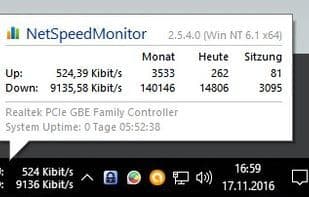
NetSpeedMonitor is a lightweight network monitoring toolbar for the Windows taskbar, designed for computers running Windows XP, Windows Server 2003, Windows Vista, or Windows 7. With NetSpeedMonitor, you can monitor the current speed (upload and download) of your network interface as well as the amount of data transferred. In addition to a connection table listing all TCP/UDP endpoints and a toolbar tooltip providing a quick, brief traffic overview, you can also view detailed daily and monthly traffic statistics. The NetSpeedMonitor toolbar does not require additional drivers like other network monitoring tools!
How to use Netspeedmonitor?
NetSpeedMonitor is a lightweight Windows taskbar network monitoring tool that displays real-time upload/download speeds and data transfer volumes, providing detailed traffic statistics for easy network usage tracking.
Core Functions of Netspeedmonitor
Lightweight
Network speed monitor
Online Activities
Traffic monitoring
Usage Scenarios of Netspeedmonitor
- Monitor current upload and download speeds of network interfaces
- View total amount of data transferred
- Obtain detailed daily and monthly traffic statistics
- Display download/upload speeds of specific network adapters on Windows taskbar
- Quickly view traffic overview via tooltips
- View connection tables of all TCP/UDP endpoints
Common Questions about Netspeedmonitor
What does NetSpeedMonitor do?
How do I use NetSpeedMonitor?
What are the core features of NetSpeedMonitor?
What are the application scenarios of NetSpeedMonitor?



















