




Product Information
What is Network utility?
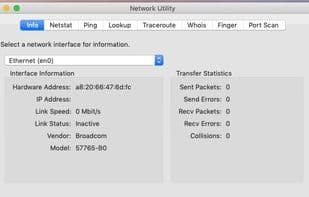
Network Utility is an application included with macOS up to MacOS Catalina, offering a variety of tools for collecting and analyzing computer network information.
Starting from macOS Big Sur, this application is no longer included. Network Utility displays information about each network connection, including the interface's MAC address, assigned IP address, speed and status, counts of sent and received packets, as well as transmission errors and collision counts.
**Services**
Available services or tools found in Network Utility:
- Network Interfaces
- Netstat
- Ping
- Lookup
- Traceroute
- Whois
- Finger
- Port Scan
**Actionable Items**
Examples where Network Utility can assist:
- Checking your network connection
- Viewing network routing tables and statistics
- Testing connectivity to another computer
- Testing your DNS server
- Tracing the path of network traffic
- Checking open TCP ports
**Port Scan Information**
Network Utility primarily utilizes tools from Unix directories for most of its functionalities. However, for port scanning, it employs a Unix executable from its resources folder, located at `Network Utility.app/Contents/Resources/Stroke`.
**How to Open It**
- In OS X Mavericks and macOS, Network Utility is located in `/System/Library/CoreServices/Applications`.
- In OS X Mountain Lion, Lion, and Snow Leopard, it can be found in the "Utilities" folder within the "Applications" directory.
You can also use Spotlight to locate Network Utility.
How to use Network utility?
Network Utility is a built-in macOS application offering various tools for collecting and analyzing computer network information, helping users check connections and diagnose issues.
Core Functions of Network utility
Network Tools
Usage Scenarios of Network utility
- Check network connectivity.
- View network routing tables and statistics.
- Test connectivity to other computers.
- Test DNS servers.
- Trace the path of network traffic.
- Check open TCP ports.
Common Questions about Network utility
What does Network Utility do?
How do I use Network Utility?
What are the core features of Network Utility?
What are the use cases for Network Utility?



















