




Product Information
What is Npackd?
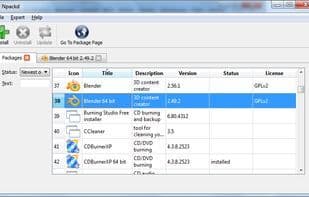
Npackd (pronounced "unpacked") is an app store/package manager/marketplace for Windows applications. It helps you find and install software, keeps your system up to date, and uninstalls programs when they're no longer needed.
Key Features
- Proxy support (configured via Internet Settings Control Panel)
- Password-protected pages. This can be used to restrict access to your repository.
- Fast installation and uninstallation without user interaction. Typical applications install and uninstall in seconds (downloading packages is the most time-consuming operation).
Dependencies
- Additional scripts can be defined for more complex installations and uninstallations.
- Shortcuts in the Start Menu are automatically created/removed.
- Multiple versions of a program can be installed in parallel.
- Encrypted checksums (SHA1) for packages.
- Detection of certain software packages, even if they weren't installed by Npackd (Windows, JRE, JDK, .NET, Windows Installer, Microsoft Core XML Services).
- Prevents uninstallation of running programs.
How to use Npackd?
Npackd is a Windows app store and package manager for finding, installing, updating, and uninstalling software ad-free.
Core Functions of Npackd
Software Installer
Package manager
Usage Scenarios of Npackd
- Find and install Windows applications.
- Keep system software up to date.
- Uninstall software that is no longer needed.
- Quickly install software via the command line.
- Install multiple versions of programs and keep them coexisting.
- Host your own software repository.
Common Questions about Npackd
What does Npackd do?
How do I use Npackd?
What are the core features of Npackd?
What are the use cases for Npackd?



















