




Product Information
What is Omnistat?
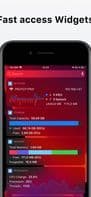
Omnistat allows you to easily access technical information about your device right from the app or even a widget.
With Omnistat for iOS, you can view:
Device name
Hostname
Device model
Internal device name
Operating system name
Current OS version
Current OS build number
Kernel version
Device uptime
Current Wi-Fi network
Wi-Fi BSSID and SSID
Wireless network interface
IPv4 and IPv6 addresses for each connected Wi-Fi interface
Wi-Fi data usage (download/upload)
Download/upload speed over Wi-Fi
Carrier
Carrier mobile country code
Carrier network country code
Carrier ISO country code
Carrier radio technology
Cellular interface
IPv4 and IPv6 addresses for each connected cellular interface
How to use Omnistat?
Omnistat is an iOS app and widget that provides easy access to technical information about iOS devices.
Core Functions of Omnistat
Mobile usage tracking
Usage Scenarios of Omnistat
- View the name, model, and OS version of iOS devices.
- Get detailed Wi-Fi network information, including BSSID, SSID, IP address, and data usage.
- Learn about cellular network carrier information, country codes, and interface details.
- Monitor device uptime and kernel version.
Common Questions about Omnistat
What does Omnistat do?
How do I use Omnistat?
What are the core features of Omnistat?
What are the use cases for Omnistat?




















