




Product Information
What is Scaler bandwidth monitor?
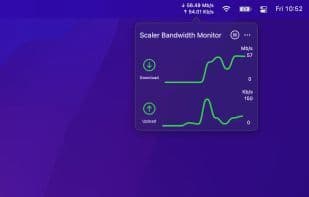
Scaler is a bandwidth monitoring application designed for macOS devices. The Scaler Bandwidth Monitor resides in the menu bar, allowing you to track your device's current combined incoming and outgoing network traffic.
The app features:
Real-time monitoring of system download and upload speeds directly from the menu bar.
A graphical overview of recent network speeds.
Universal app support (compatible with native M1 macOS devices).
Customization: Adjust the appearance of menu bar data by modifying visible speed types, units, line counts, and colors.
Pause or resume the app at any time.
The app does not collect any data and requires no permissions. It utilizes built-in macOS functionalities to calculate speeds.
If you have any suggestions or feature requests, feel free to reach out: [email protected] or Twitter @FaisalBAhmed.
How to use Scaler bandwidth monitor?
Scaler Bandwidth Monitor is a macOS bandwidth monitoring app that tracks real-time inbound and outbound network traffic on your device, providing live speed displays and historical chart overviews.
Core Functions of Scaler bandwidth monitor
Traffic Monitoring
Usage Scenarios of Scaler bandwidth monitor
- Monitor system download and upload speeds in real-time from the macOS menu bar.
- View a chart overview of recent network speeds.
- Customize the type, units, number of lines, and colors of network speeds displayed in the menu bar.
- Pause or resume the app's network monitoring feature at any time.
Common Questions about Scaler bandwidth monitor
What does Scaler Bandwidth Monitor do?
How do I use Scaler Bandwidth Monitor?
What are the core features of Scaler Bandwidth Monitor?
What are the application scenarios for Scaler Bandwidth Monitor?



















