




Product Information
What is Scrapbook x?
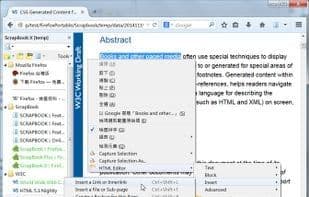
ScrapBook X is a Firefox add-on based on ScrapBook Plus, incorporating many features from the latest version of ScrapBook.
Features
Faithful Web Page Preservation: Saves web pages exactly as they appear on screen, without losing any fine details. The save time and source URL are also recorded for future reference.
Partial Content Saving: You can save specific parts of a webpage. Choose whether to include images, audio and video files, fonts, frames, styles, and/or scripts. Decide how to handle saved styles. Edit webpage content before saving to suit your preferences. Save web pages as bookmarks. ...And there are even more saving options available.
Extensive Saving Capabilities: Save web pages along with their linked files, save multiple open tabs at once, use URL lists to save a series of pages, ... and access additional batch-saving features.
Data Management: Organize saved items in a tree structure, as easily as managing bookmarks.
Data Search: Use the built-in full-text engine to search any fragment within saved web pages.
Data Editing: Add highlights, comments, and annotations, or even edit the source HTML of saved pages.
Note-Taking: Create note pages within ScrapBook and edit them as effortlessly as web pages.
Data Import and Export: Merge multiple data items into one. Generate HTML tree lists and create static ScrapBook websites. Configure multiple ScrapBook databases that operate independently. Import and export data items for backup or sharing.
Add-Ons: Several Firefox add-ons can integrate with ScrapBook to extend its functionality, such as these plugins.
How to use Scrapbook x?
ScrapBook X is a Firefox add-on for saving web content to local devices for later retrieval, organization, annotation, and editing, faithfully preserving page details and offering robust management features.
Core Functions of Scrapbook x
Web clipping
No Registration Required
Save articles
Website Downloader
Save Web Pages for Offline Use
Legacy Firefox Plugin
Usage Scenarios of Scrapbook x
- Faithfully save webpage content, including all details, for offline viewing and reference.
- Selectively save parts of webpages, such as images, audio, video, or specific text.
- Batch-save multiple open tabs or multiple pages via URL lists.
- Manage saved webpage data in a tree structure for easy organization and retrieval.
- Perform full-text searches on saved pages to quickly locate information.
- Add highlights, comments, annotations, or directly edit HTML content on saved pages.
Common Questions about Scrapbook x
What does ScrapBook X do?
How do I use ScrapBook X?
What are the core features of ScrapBook X?
What are the use cases for ScrapBook X?



















