




Product Information
What is Scriptable?
Scriptable is an automation tool that enables you to write scripts that integrate with native iOS functionalities, such as files, calendars, reminders, documents, and much more.
Your scripts can be run from the Scriptable app, Siri Shortcuts, or other applications using the Share Sheet extension or Scriptable URL schemes.
Features include:
- Write and execute JavaScript.
- Autocomplete variable names, functions, keywords, and properties as you type.
- Access numerous native iOS features through JavaScript code, including managing files, calendars, reminders, contacts, photos, locations, the clipboard, web views, and more.
- Extensive support for Siri Shortcuts, allowing you to display images, tables, websites, HTML, and more in Siri, and have Siri read text aloud.
- Support for input and output parameters in Siri Shortcuts.
- Easily schedule rich notifications to run your scripts periodically.
- Use file bookmarks to handle files and directories from third-party apps.
- Sync scripts across all your devices using iCloud Drive.
- Scripts are stored as plain JavaScript files and can be browsed using the Files app.
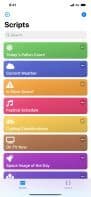
- Assign one of over 800 glyphs and a color to a script for easy identification in the script directory.
- Run scripts by 3D Touching the app icon.
- Execute scripts from the Share Sheet and process input.
- Schedule notifications and run scripts directly from them.
- URL schemes allow you to run scripts from other apps.
- Support for x-callback-url, enabling advanced integration with other apps that support x-callback-url.
- Export and share scripts.
- Example scripts to help you get started creating your own.
- Comprehensive documentation on all native APIs available for use in scripts, accessible offline within the app or online at docs.scriptable.app.
- View documentation in a separate window on iPad.
- Dark mode support.
- Customize the editor to suit your preferences.
How to use Scriptable?
Scriptable is an iOS automation tool that lets users write JavaScript scripts to integrate and control native iOS features, automating tasks.
Core Functions of Scriptable
Workflow
Task Automation
Usage Scenarios of Scriptable
- Run scripts quickly via 3D Touch on app icons.
- Run scripts from the Share Sheet and process inputs.
- Schedule notifications and run scripts directly from them.
- Use URL schemes to launch and run scripts from other apps.
- Display images, tables, websites, or have Siri read text via Siri Shortcuts.
- Schedule rich notifications to automatically run scripts.
Common Questions about Scriptable
What does Scriptable do?
How do I use Scriptable?
What are the core features of Scriptable?
What are the use cases for Scriptable?




















