




Product Information
What is Serveo?
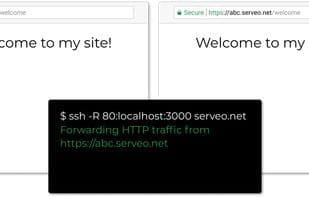
Use it like `ssh -R 80:localhost:8888 serveo.net`.
When you establish an SSH connection to serveo.net, a subdomain is assigned to forward HTTP (and HTTPS) traffic to your local server.
Basic usage is as follows:
`ssh -R 80:localhost:8888 serveo.net`
The `-R` option instructs the SSH client to request port forwarding from the server and proxy requests to the specified host and port (typically localhost). A subdomain of serveo.net will be assigned to forward HTTP traffic.
Multiple port forwards can be requested at once:
`ssh -R 80:localhost:8888 -R 80:localhost:9999 serveo.net`
The target server does not have to be on localhost:
`ssh -R 80:example.com:80 serveo.net`
Subdomains are deterministically selected based on your IP address, the provided SSH username, and subdomain availability, so you will usually get the same subdomain between restarts. You can also request a specific subdomain (from a predefined list):
`ssh -R incubo:80:localhost:8888 serveo.net`
`ssh -R incubo.serveo.net:80:localhost:8888 serveo.net`
Change the SSH username to assign a different subdomain:
`ssh -R 80:localhost:8888 [email protected]`
Ports other than 80 may be requested, and raw TCP traffic will be forwarded. (In this case, connections cannot be routed by hostname, and the host—if specified—will be ignored.)
`ssh -R 1492:localhost:1492 serveo.net`
If port 0 is requested, a random TCP port will be forwarded:
`ssh -R 0:localhost:1492 serveo.net`
How to use Serveo?
Serveo is an SSH server for exposing local servers to the internet, forwarding HTTP/HTTPS/TCP traffic with public URLs—no installation or registration needed.
Core Functions of Serveo
No installation required, SSH, no registration, forward responses, SSH tunneling, port forwarding
Usage Scenarios of Serveo
- Expose local HTTP/HTTPS servers to the internet for external access.
- Forward traffic from multiple local ports or non-local servers simultaneously.
- Request and use specific subdomains for access.
- Forward raw TCP traffic, including non-HTTP ports.
- Route private TCP traffic to achieve lightweight VPN functionality.
- Test and demo locally developed applications.
Common Questions about Serveo
What does Serveo do?
How do I use Serveo?
What are the core features of Serveo?
What are the use cases for Serveo?



















