




Product Information
What is Shapespark?
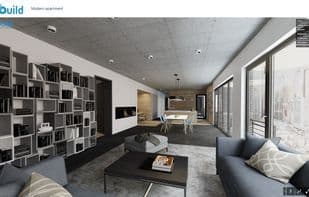
With Shapespark, you can create realistic web-based walkthroughs from Autodesk® Revit® models, which can be easily shared via links and opened directly in desktop or mobile web browsers.
Key Features:
Complete freedom of movement. Let your clients step into a space and move around freely to inspect every corner and detail. Make them feel as if they're truly there. Unlike 360-degree panoramas, the presentation isn't limited to a few selected viewpoints, and there's no distortion at the edges of the screen.
An integrated lightmap baking engine with automatic UV unwrapping. Lightmaps enable realistic lighting during the presentation without requiring a powerful computer, so results can be viewed even on mobile devices or laptops with integrated GPUs. To speed up the baking process, you can use CUDA-enabled graphics cards or multiple CPUs.
No programming knowledge required. Unlike game engines, Shapespark is designed for designers and 3D artists, so no programming skills are needed to create real-time visualizations.
Virtual reality support. Shapespark uses WebXR, allowing visualizations to be viewed not only on flat screens but also in VR via desktop (Oculus, HTC Vive, Microsoft Mixed Reality) or standalone headsets (Oculus Quest, Google Cardboard).
Interactive features. You can place material selectors in the model to allow users to change materials. You can also add clickable elements to display additional information to users. Video textures and background music can be incorporated into the presentation.
Visualizations can be branded with your own logo or URL address.
How to use Shapespark?
Shapespark converts architectural 3D models into realistic web-based virtual tours, helping architects, designers, and real estate marketers showcase designs and create interactive visualizations easily.
Core Functions of Shapespark
Virtualization
Virtual Reality
3D Renderer
Interior design
Rendering
Real-time rendering
Usage Scenarios of Shapespark
- Real estate marketing projects
- Architecture and interior design showcases
- Office space planning
- Virtual showrooms and museums
- Video conversations during virtual tours via 3D meetings
- Let clients virtually tour properties under construction
Common Questions about Shapespark
What does Shapespark do?
How do I use Shapespark?
What are the core features of Shapespark?
What are the use cases for Shapespark?



















