




Product Information
What is Text editor anywhere?
Text Editor Anywhere enables you to edit text anywhere using your preferred text editor. It offers a way to leverage advanced features available only in external text editors, such as auto-completion, spell checking, and syntax highlighting. It also helps you avoid web browser crashes.
For instance, with Text Editor Anywhere, you can use Vim to tweet or reply to posts in Chrome.
- Supports various text editors
- Works with all applications
- Unicode compatible
- Allows passing complex parameters to the editor
It’s incredibly easy to use:
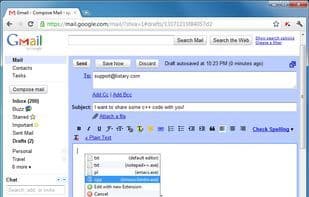
Step 1: Press Win + A when needed. Hold the Win key and repeatedly press "A" to select a different file extension or edit text with a new extension. It works similarly to Alt + Tab.
Step 2: Edit the text in your favorite editor.
Step 3: Save the file and close the editor (or simply switch back with Alt + Tab), and your text will be right there!
How to use Text editor anywhere?
Text Editor Anywhere allows users to edit text using their preferred text editor anywhere. It enables users to leverage advanced features of external editors, such as autocomplete, spell-check, and syntax highlighting.
Core Functions of Text editor anywhere
Portable
Usage Scenarios of Text editor anywhere
- Use the Vim editor in Chrome to compose tweets or reply to posts
- In Windows, launch a custom editor in any text field via hotkey
Common Questions about Text editor anywhere
What does Text Editor Anywhere do?
How do I use Text Editor Anywhere?
What are the core features of Text Editor Anywhere?
What are the application scenarios of Text Editor Anywhere?



















