




Product Information
What is Textpipe?
One Tool - Minimal Maintenance. With TextPipe, you can specify all your text processing tasks in one place, rather than remembering and managing multiple manual operations across various text editors, command-line tools, custom scripts, and Word and Excel macros. What does TextPipe do? TextPipe quickly and easily transforms, converts, and repurposes data in text files, including:
• HTML, XML, and other structured documents from the WWW
• Fixed-length or delimited files (CSV, tab, pipe, etc.)
• Unix, mainframe, and PC/Windows line-ending formats
• Internal Zip files and the new Microsoft Office 2007 formats DOCX, XLSX, PPTX
• ASCII, ANSI, Unicode, and EBCDIC files
• Security log files from firewalls, web servers, etc.
• Structured formats like EDIFACT, HL7, SWIFT, etc.
• Spooled print files
• Structured and unstructured reports of any size or dimension
How to use Textpipe?
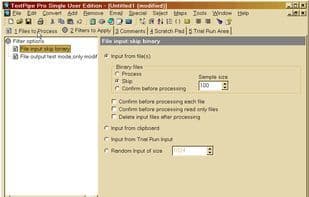
Textpipe is a versatile text processing tool aimed at quickly and easily converting, transforming, and repurposing data in text files, centralizing all text processing functions in one tool to avoid using multiple manual tools.
Core Functions of Textpipe
Pattern matching
Text processing
Usage Scenarios of Textpipe
- Transform, Convert, and Repurpose Data in Structured Documents Like HTML, XML.
- Process Fixed-Length or Delimited Files Like CSV, Tab, Pipe Formats.
- Handle Data Inside Zip Files and Microsoft Office 2007/2010 Formats (DOCX, XLSX, PPTX).
- Perform EBCDIC to ASCII Conversion, e.g., Mainframe EBCDIC Files to PC Format.
- Execute ETL, ELT, Text Mining, Data Cleaning, and Data Transformation.
- Process Structured Formats Like Security Logs, EDIFACT, HL7, SWIFT.
Common Questions about Textpipe
What does Textpipe do?
How do I use Textpipe?
What are the core features of Textpipe?
What are the use cases for Textpipe?


















