




Product Information
What is 2 steps?
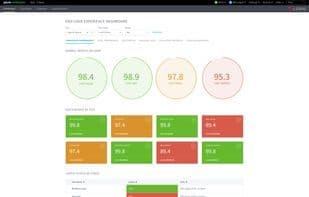
For the first time, Splunk users can set up synthetic tests without needing to run agents within the monitored applications. 2 Steps also creates video replays of application issues in Splunk, enabling IT experts to quickly and easily identify problems.
While synthetic monitoring for web-based applications has been around for over a decade, 2 Steps is set to transform businesses by offering experience automation across any platform—be it web, Windows, Java, or mobile applications. 2 Steps can monitor any software that runs on a virtual machine. Everything is done with just a few clicks, eliminating the need for additional code tailored to a company’s software. Since no coding is required, anyone in the organization can run tests on the software to evaluate changes or upgrades, or to replicate issues that customers might encounter.
Beyond pinpointing problems and potential issues, 2 Steps generates videos that developers can use to better understand and explain issues, as well as how they might impact customers. Additionally, 2 Steps provides detailed reports that are easy to understand and valuable to everyone in the company—from development and sales teams to top executives.
Companies interested in learning more about how 2 Steps can revolutionize their application monitoring process can view a demo and sign up for a four-week free trial at www.2steps.io. They can also request a free copy of the company’s eBook, *The Definitive Guide to Experience Automation*, via the website.
How to use 2 steps?
2Steps is a no-code user journey and business process monitoring tool that lets companies conduct synthetic tests on platforms like web, Windows, Java, or mobile apps in Splunk, with issue video playback to help IT experts quickly identify and resolve app problems.
Core Functions of 2 steps
Website monitoring, uptime monitoring, performance monitoring, application monitoring, server monitoring, cloud monitoring
Usage Scenarios of 2 steps
- Monitor mobile app performance and user experience.
- Conduct synthetic tests for web, Windows, Java, or mobile apps in Splunk.
- Test software changes or upgrades.
- Reproduce software issues encountered by customers.
- Continuously perform performance checks on critical applications and websites.
- Monitor any software running on virtual machines.
Common Questions about 2 steps
What does 2Steps do?
How do I use 2Steps?
What are the core features of 2Steps?
What are the use cases for 2Steps?




















