




Product Information
What is Voom?
Creator:
Vlad Ilnov
Script Type:
Utility
Description:
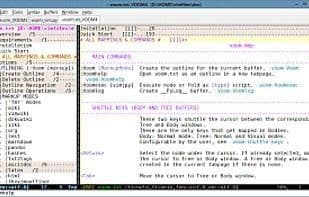
VOoM (Vim Outliner of Markups) is a Vim plugin that emulates a two-pane text outliner.
Homepage: http://www.vim.org/scripts/script.php?script_id=2657
GitHub Mirror: https://github.com/vim-VOoM/VOoM
Screenshots and Animations: https://vim-VOoM.github.io/
Bug Reports, Issues, Requests: https://github.com/vim-VOoM/vim-VOoM.github.com/issues
Additional Materials: https://github.com/vim-VOoM/VOoM_extras
VOoM was initially designed to work with fold markers that include level numbers, such as {{{1, {{{2, {{{3, etc. (Refer to :help Fold-marker. The markers are specified by the 'foldmarker' option. It does not support closing fold markers with levels, like }}}3, }}}2, etc.)
Currently, VOoM can handle over 20 markup formats that feature headings and support outline structures, including popular lightweight markup languages such as reST, Markdown, Pandoc, AsciiDoc, Org-mode, Wiki, LaTeX, and more. (Headings are also referred to as headers, titles, section headings, or captions.)
How to use Voom?
VOoM is a Vim plugin that turns Vim into a dual-pane text outliner, helping users organize files (including source code) with support for multiple markup formats.
Core Functions of Voom
Markdown Support
Text Editing
Outline
Usage Scenarios of Voom
- Organize various files, including source code.
- Process documents in multiple markup languages like reStructuredText, Markdown, AsciiDoc, Org-mode, Wiki, and LaTeX.
- Rearrange document sections through outline operations.
- View help files in outline form within Vim.
- Display different parts of the outline in separate windows or tabs.
Common Questions about Voom
What does VOoM do?
How do I use VOoM?
What are the core features of VOoM?
What are the use cases for VOoM?



















