




Product Information
What is Wakeonlan?
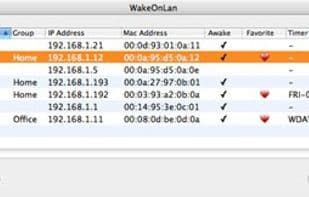
What is WakeOnLan? WakeOnLan discovers all other computers in the LAN and allows you to wake them with a click of a button. If your remote computer is a Mac, you can also put it to sleep.
**Scheduled Wake-up Service**
In addition to timer-based wake-up calls, each computer can be scheduled to wake up frequently on a specific day of the week (or just weekdays or weekends) at a time of your choosing. For example, schedule a wake-up at 04:00 every Sunday night for backups.
**WakeOnLan Dashboard Widget**
Need to quickly wake up another computer but don’t want to launch the WakeOnLan app? Just press F12 and use the WakeOnLan widget. Simply select the computer you want to wake up and click the sun. Press F12 again to finish.
**New for all Mac OS X versions: Dock Menu**
Everyone gets faster access. Click and hold the WakeOnLan icon in the Dock (while WakeOnLan is running), then select any computer you want to wake up or put to sleep directly from the menu. It doesn’t get any simpler than this.
**About WakeOnLan**
WakeOnLan is freeware. It’s a universal application that runs on Mac OS X 10.5 Leopard, 10.4 Tiger, and 10.3 Panther.
How to use Wakeonlan?
WakeOnLan is a free Mac tool that discovers other computers on the local network and allows users to wake or put them to sleep with one click, facilitating remote access and management.
Core Functions of Wakeonlan
Wake-on-LAN
Network Tools
Usage Scenarios of Wakeonlan
- Access Files on Other Macs
- Schedule Wake-Up for Backup Tasks, e.g., Every Sunday at 4 AM
- Quickly Wake a Computer via Dashboard Widget
- Directly Wake or Sleep a Computer via Dock Menu
Common Questions about Wakeonlan
What does WakeOnLan do?
How do I use WakeOnLan?
What are the core features of WakeOnLan?
What are the application scenarios for WakeOnLan?




















