




Product Information
What is Wifiner - wifi analyzer?
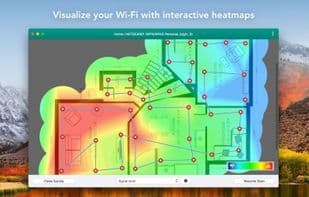
Easily analyze your Wi-Fi and identify issues that hinder a stable, fast connection. Conduct a comprehensive scan of your wireless network to obtain an interactive color-coded heatmap, clearly revealing "dead zones."
Visualization is key to effective planning—once you scan the site, Wifiner creates a visual heatmap of your space, helping you understand where your network needs improvement and how to reposition access points for optimal placement.
Wifiner offers 11 types of heatmaps to better understand which parameters impact your network the most and compare them against each other. It’s user-friendly enough for those setting up their first home network while providing incredibly detailed reports for seasoned professionals in the field.
It couldn’t be simpler: upload your floor plan, mark your location on the map, and Wifiner will immediately start gathering data. Walk in a zigzag pattern from one wall to another to get comprehensive results for the entire space. With this collected data, you’ll have all the resources needed to analyze signal leakage, detect noise sources, understand your Wi-Fi channels, identify ineffective access points, and more.
How to use Wifiner - wifi analyzer?
Wifiner analyzes wireless networks, identifies dead zones, and optimizes layouts with heatmaps for stable high-speed connections.
Core Functions of Wifiner - wifi analyzer
Network Scanner
Wireless Scanner
Wireless
Usage Scenarios of Wifiner - wifi analyzer
- Conduct Wi-Fi field surveys
- Analyze and troubleshoot Wi-Fi issues
- Plan Wi-Fi network layouts for homes or offices
- Identify signal leaks and noise sources
- Optimize wireless access point placement
- Understand Wi-Fi channels and identify inefficient access points
Common Questions about Wifiner - wifi analyzer
What does Wifiner do?
How do I use Wifiner?
What are the core features of Wifiner?
What are the application scenarios of Wifiner?



















