




Product Information
What is Winhotspot?
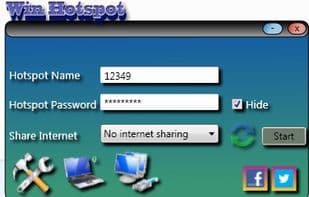
Win Hotspot is a portable WiFi hotspot application with a built-in WiFi scanner that lists channels, signal percentages, and more.
It also features a bandwidth meter and WiFi repair tool.
Please update to version 1.2, as the internet sharing error has been fixed.
Using it is simple: just set the hotspot name, password, and internet sharing options, then press the "Start" button! The app installs the Microsoft Miniport WiFi driver, enabling you to share your connection with smartphones and other devices. Winhotspot scans all nearby WiFi networks and displays their signal quality and channels.
You'll receive the best support from the developers.
It includes a safe mode.
It supports Windows 8.
It is more stable.
It shows connected clients.
It has a built-in bandwidth meter.
It automatically installs the Miniport driver/virtual WiFi hotspot driver.
It comes with the best troubleshooting tools.
If your laptop's WiFi is physically turned off, this is the only software so far that can detect and notify you.
In a classroom, one person with internet access can connect to Winhotspot and share/extend coverage over a wide geographic area.
Check out Winhotspot videos on YouTube.
How to use Winhotspot?
No usage instructions available, please contact customer service for details
Core Functions of Winhotspot
Portable
Wireless
Jira integration
Usage Scenarios of Winhotspot
No usage scenarios available, please contact customer service for details
Common Questions about Winhotspot
No common questions available, please contact customer service for details



















