




Product Information
What is Xpipe?
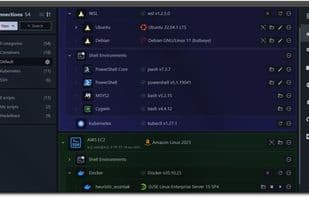
XPipe is a next-generation shell connection hub and remote file manager that enables you to access your entire server infrastructure from your local machine. It operates on top of the command-line programs you've installed, requiring no setup on remote systems. Thus, if you typically connect to servers using CLI tools like ssh, docker, or kubectl, you can seamlessly integrate XPipe with them. XPipe fully integrates with your preferred tools, such as your favorite text/code editors, terminals, shells, and command-line utilities. Designed for extensibility, the platform allows anyone to easily add support for more tools or customize functionalities through its modular extension system.
Currently, it supports:
- SSH connections, profiles, and tunnels
- Docker, Podman, LXD, and Incus containers
- Proxmox PVE virtual machines and containers
- Hyper-V, KVM, VMware Player/Workstation/Fusion virtual machines
- Kubernetes clusters, pods, and containers
- Tailscale and Teleport connections
- Windows Subsystem for Linux (WSL), Cygwin, and MSYS2 environments
- PowerShell remote sessions
- RDP and VNC connections
How to use Xpipe?
XPipe is a novel shell connection hub and remote file manager, allowing users to access entire server infrastructures from a local machine without remote setup.
Core Functions of Xpipe
Privacy-first
Support Themes
Portable
No tracking
Ad-Free
Dark Mode
Usage Scenarios of Xpipe
- Manage and access entire server infrastructure from a local machine
- Centrally manage all remote connections and quickly launch terminal sessions
- Browse and manage file systems of remote systems and perform file transfers
- Integrate with various container runtimes (e.g., Docker, Kubernetes) and hypervisors (e.g., Proxmox, VMware)
- Sync connection information via Git repositories to support team collaboration
- Automatically tunnel remote service ports to the local desktop
Common Questions about Xpipe
What does XPipe do?
How do I use XPipe?
What are the core features of XPipe?
What are the application scenarios of XPipe?




















