
Product Information
What is RemoteSpace?
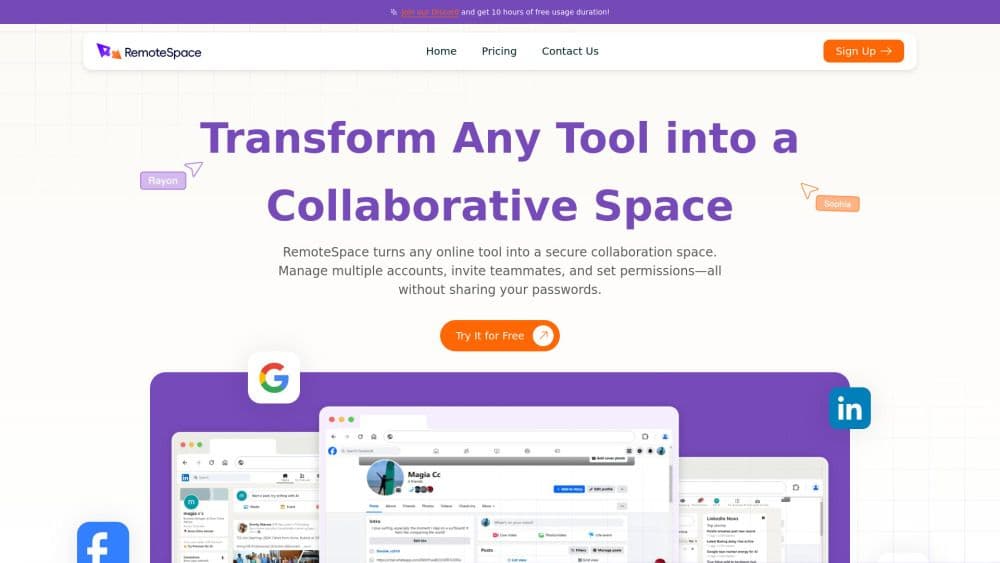
RemoteSpace is an innovative collaboration platform designed to transform any online tool into a secure and efficient collaborative workspace. With RemoteSpace, users can effortlessly manage multiple accounts, invite team members, and set permissions—all without the need to share passwords.
**Key Features:**
**Seamless Account Management:** RemoteSpace simplifies the process of accessing multiple online accounts simultaneously. Users can navigate between different accounts without repeated logins, streamlining workflows and boosting productivity.
**Enhanced Collaboration:** The platform provides teams with a dedicated environment for real-time project collaboration. Team members can engage in discussions, brainstorming, and meetings without additional software, ensuring smooth and effective communication.
**User-Centric Interface:** Designed with user experience in mind, RemoteSpace features an intuitive interface suitable for teams of all sizes. This user-friendly design allows individuals to focus on tasks without unnecessary distractions, enhancing overall efficiency.
**Robust Security Protocols:** Protecting user data is a top priority for RemoteSpace. The platform integrates advanced security measures, including AI diagnostics and a zero-trust architecture, ensuring activities and personal information remain isolated. This robust security framework safeguards sensitive data from potential threats.
**Comprehensive File Management:** RemoteSpace enables users to securely organize and manage files across different projects. This feature eliminates the risk of data loss or confusion, ensuring team members always have access to necessary documents.
**Asynchronous Collaboration Capabilities:** The platform supports asynchronous collaboration, allowing team members to contribute and review tasks at their convenience, regardless of location or time zone. This flexibility fosters inclusivity and accommodates diverse working styles.
**Privacy Assurance:** RemoteSpace places a high priority on user privacy. Collaborators can participate in discussions and activities without exposing personal data, ensuring all interactions within the platform remain confidential.
**Transform Your Team’s Collaboration:**
With RemoteSpace, teams can unlock new levels of productivity and creativity in their collaborative efforts. Experience a new era of teamwork that combines security, efficiency, and ease of use. RemoteSpace is the essential tool for modern organizations to thrive in an increasingly competitive landscape. Embrace the future of collaboration with RemoteSpace—where teamwork knows no bounds!
How to use RemoteSpace?
No usage instructions available, please contact customer service for details
Core Functions of RemoteSpace
1. Marketing Campaign Management: When managing marketing campaigns across multiple platforms, teams often need to collaborate on managing a single website account. RemoteSpace allows multiple team members to access and manage marketing tools simultaneously without sharing passwords, ensuring smooth coordination of marketing activities.
2. E-commerce Operations: In e-commerce, maintaining a unified presence across different online stores is crucial. RemoteSpace enables team members to collectively manage product listings, respond to customer inquiries, and analyze sales data to enhance efficiency and improve responsiveness to market changes.
3. Customer Support Coordination: For teams using online customer service tools, RemoteSpace facilitates the process of managing customer interactions. Team members can share account access, allowing them to jointly handle customer queries and issues without cumbersome password sharing, thereby improving the overall customer experience.
4. Temporary Third-Party Access: When temporary access needs to be granted to third-party collaborators (e.g., consultants or freelance marketers), RemoteSpace securely shares accounts. Administrators can easily set permissions, enabling external contributors to work on projects while ensuring sensitive data remains protected.
5. Team Training and Onboarding: During training and new member onboarding, RemoteSpace can be used to grant new members access to relevant accounts. Existing team members can safely guide newcomers through tools and processes, ensuring a smooth team transition.
Usage Scenarios of RemoteSpace
- What does it mean to turn any tool into an online collaboration mode?
- What scenarios can RemoteSpace be applied to?
- How do you ensure the security of my data in the cloud?
Common Questions about RemoteSpace
No common questions available, please contact customer service for details