
Product Information
What is Gitfinder?
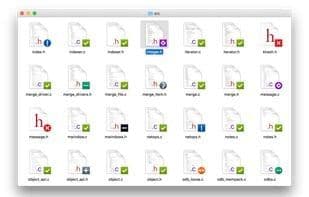
A fast, lightweight git client for Mac, integrated with Finder. View the git status of files directly in Finder using descriptive icon badges. Perform a wide range of git operations right from Finder with customizable context and/or toolbar item menus. GitFinder also functions as a fully-featured git client, offering a comprehensive repository browser that displays local and remote branches, tags, and submodules, along with diffs, repository and file history, blame, and conflict resolution.
How to use Gitfinder?
GitFinder is a fast and lightweight Git client for Mac, deeply integrating Git functionality into Finder, allowing users to view file status and perform various Git operations directly in Finder, along with a feature-rich repository browser.
Core Functions of Gitfinder
Git Support, Apple Finder Integration
Usage Scenarios of Gitfinder
- View Git status of files directly in Finder.
- Perform Git operations via Finder context menu or toolbar.
- Browse branches, tags, and submodules of local and remote Git repositories.
- View file diffs and commit history in a separate window.
- Resolve code merge conflicts.
- Handle pull requests for remote repositories directly in the client.
Common Questions about Gitfinder
What does GitFinder do?
How do I use GitFinder?
What are the core features of GitFinder?
What are the use cases for GitFinder?