




Product Information
What is Keolot phaser editor?
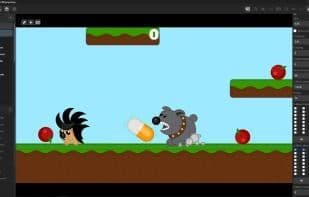
Keolot Phaser Editor is a free 2D browser game visual development environment based on the open-source Phaser engine, integrated with Matter JS physics. This application features built-in capabilities to visually create and edit scenes, game objects, animations, audio, and key inputs, write game logic in Javascript, and connect plugins and global scripts. Compared to directly using the Phaser library without visual representation, the process of designing games is significantly simplified with the aid of visual elements.
In the interactive editor, you can intuitively create designs, move objects, and add new ones. Navigation within the design is facilitated using the mouse and interface elements, including zoom adjustments, while rulers with coordinates help you navigate conveniently. You can visually add, duplicate, edit, and delete the following Phaser game objects:
- Images
- Text
- Sprites
- Particles
- Videos
- Rectangles
- Tile Sprites
Beyond the interactive editor mode, there are two game preview modes:
1. **Scene Preview**: Here, you can pause and resume gameplay, interact with objects, and modify their parameters in real-time via the inspector. In this mode, you cannot switch between scenes within the game—it is strictly for viewing a specific scene. Additionally, scene preview mode launches in physics debug mode.
2. **Game Preview**: Launches the game as-is, without the ability to inspect objects or pause gameplay.
**Preview Modes**: Visual Editor, Scene Preview, Game Mode
A console is available for debugging and error tracking.
The object inspector allows you to set parameters for game objects (such as X/Y coordinates, angle, opacity, texture, depth, etc.), adjust physics settings, particle properties (e.g., lifespan, frequency, speed, alpha), and modify other attributes in the panel, such as animation types and audio settings.
Image and sprite objects can be instantly converted into physics-based Matter objects within the inspector, with configurable physics parameters (e.g., density, collision shape, collision category, restitution, gravity immunity, etc.). In the script editor, you can create and fine-tune additional properties and game objects just as you would when working directly in Phaser, but the visual editor provides everything you need.
You can also add custom scripts to scenes, such as incorporating your own functions, which will be included in the game code before `Init`. If you write any functions like `Init`, `Preload`, `Create`, or `Update` in the Custom section, they will be ignored, as there are dedicated sections for these.
Projects can be saved and exported as ZIP files, and completed games can be exported as ZIPs for browser deployment.
How to use Keolot phaser editor?
Keolot Phaser Editor is a free visual development environment for creating 2D browser games on the Phaser engine, integrated with Matter JS physics engine. It significantly simplifies game design through visual representation.
Core Functions of Keolot phaser editor
WYSIWYG Support
Usage Scenarios of Keolot phaser editor
- Visually create and edit game scenes, objects, animations, audio, and key inputs.
- Write game logic in Javascript and connect plugins and global scripts.
- Set game object parameters like coordinates, angles, opacity, textures, and depth via the object inspector.
- Convert image and sprite objects into physical Matter objects and specify physics parameters.
- Use the console for debugging and viewing errors.
- Save created projects, export as ZIP, or export completed games as ZIP to launch in a browser.
Common Questions about Keolot phaser editor
What does Keolot Phaser Editor do?
How do I use Keolot Phaser Editor?
What are the core features of Keolot Phaser Editor?
What are the use cases for Keolot Phaser Editor?



















