
Product Information
What is Tortoisegit?
TortoiseGit is a Windows Shell interface for Git, based on TortoiseSVN. It's open-source and can be fully built using free software.
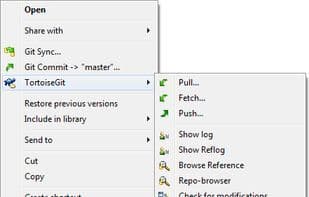
Since it is not integrated specifically for Microsoft Visual Studio, Eclipse, or any other particular IDE, you can use it with any development tool of your choice and with any type of file. The primary interaction with TortoiseGit will utilize the context menu in Windows Explorer. TortoiseGit supports you with routine tasks such as committing, displaying logs, comparing two versions, creating branches and tags, generating patches, and more (refer to our screenshots or documentation).
It is developed under the GPL. This means anyone can use it completely free of charge, including in commercial environments, without any restrictions. The source code is also freely available, so if you wish, you can even develop your own version.
How to use Tortoisegit?
TortoiseGit is a Windows Shell Git interface based on TortoiseSVN, offering a graphical Git operation method for Windows users, simplifying version control workflows.
Core Functions of Tortoisegit
Lightweight
Git support
Dark Mode
Shell Integration
Document merging
Usage Scenarios of Tortoisegit
- Perform Git commit operations directly in Windows Explorer
- View the history log of Git repositories
- Compare file differences between versions
- Create and manage Git branches and tags
- Generate code patches
- Pull, push, and merge Git code in Windows environments
Common Questions about Tortoisegit
What does TortoiseGit do?
How do I use TortoiseGit?
What are the core features of TortoiseGit?
What are the use cases for TortoiseGit?